







AI in Infrastructure
Two strands of work came together in this project: learning Microsoft’s agentic AI stack and rebuilding the edge of my home network by replacing an aging Ubiquiti EdgeRouter X. The latter expanded into migrating routing, DNS, WireGuard, filtering, and monitoring; setting up an intrusion detection system (IDS); and implementing operational reporting—all across three repositories and performed entirely by AI agents. This post is both a migration report and a look at how agentic assistance can carry one system-level change across code, live infrastructure, validation, and documentation.
First off, I can report another certification. For the previous six weeks, alongside my normal work and the Dresden AI Hackathon, I had been preparing for the Microsoft AB-100 exam. I recently passed it with a solid 780/1000 and earned the Microsoft Certified: Agentic AI Business Solutions Architect certification. It is an Expert-level, three-star certification.

The credential was not the only goal: I also wanted insight into Azure AI Foundry and Microsoft’s wider agentic ecosystem. That landscape spans code-first agents, Copilot Studio, Microsoft 365 and Power Platform, orchestration, governance, security, and operations. Following the certification path helped me build a solid understanding of agents on Azure. AB-100 is also more about architecture than prompting: clear responsibilities, tool and data boundaries, orchestration, testing, monitoring, and human oversight.
My normal workflow usually involves only OpenClaw and VS Code with Codex, which is sufficient for a personal agent. If I needed to set up specific task agents in the cloud, however, I would now know how to do it.
For the actual gateway replacement, Codex with GPT 5.6 Sol really shone: it traced affected dependencies across multiple repositories; updated configuration, code, tests, and runbooks; inspected the live machines; and migrated, deployed, and verified the services end to end. Its freedom was deliberately bounded: the gateway repository could stage releases by default, but activating production networking required me, as the Human in the Loop (HITL), to greenlight it and attend to the serial console connection. I still had to define the intent and architecture, move the physical connections, and review the result for gaps and bugs.
Why Replace the EdgeRouter X?
The EdgeRouter X had served me well. It was small, silent, efficient, and perfectly adequate when my network was simpler. Over time, however, network responsibilities expanded beyond subnet routing and the WireGuard tunnel and spread across several systems.
My server.lan machine was running BIND for the local .lan zone and Pi-hole for DNS filtering, with both services forwarding through one another. Pi-hole was a great ad filter a decade ago, but many advertisers now have countermeasures against DNS-level blocking—I needed something custom and new that would set me apart here. Network policy was also spread across several machines and configuration layers.
I wanted the replacement to become a proper infrastructure boundary:
- routing between the core, wireless, and FritzBox/IoT networks
- fail-closed Internet access through WireGuard
- authoritative and, most of all, central DNS
- explicit proxy-based ad and tracker filtering
- traffic accounting and Suricata IDS
- metrics and logs for the existing Grafana stack
- a recovery path that did not depend on the normal LAN
That is more than I wanted to keep squeezing into an EdgeRouter appliance, but it is still a very modest workload for a normal x86 Linux system.
Old Silicon, Right-Sized Machine
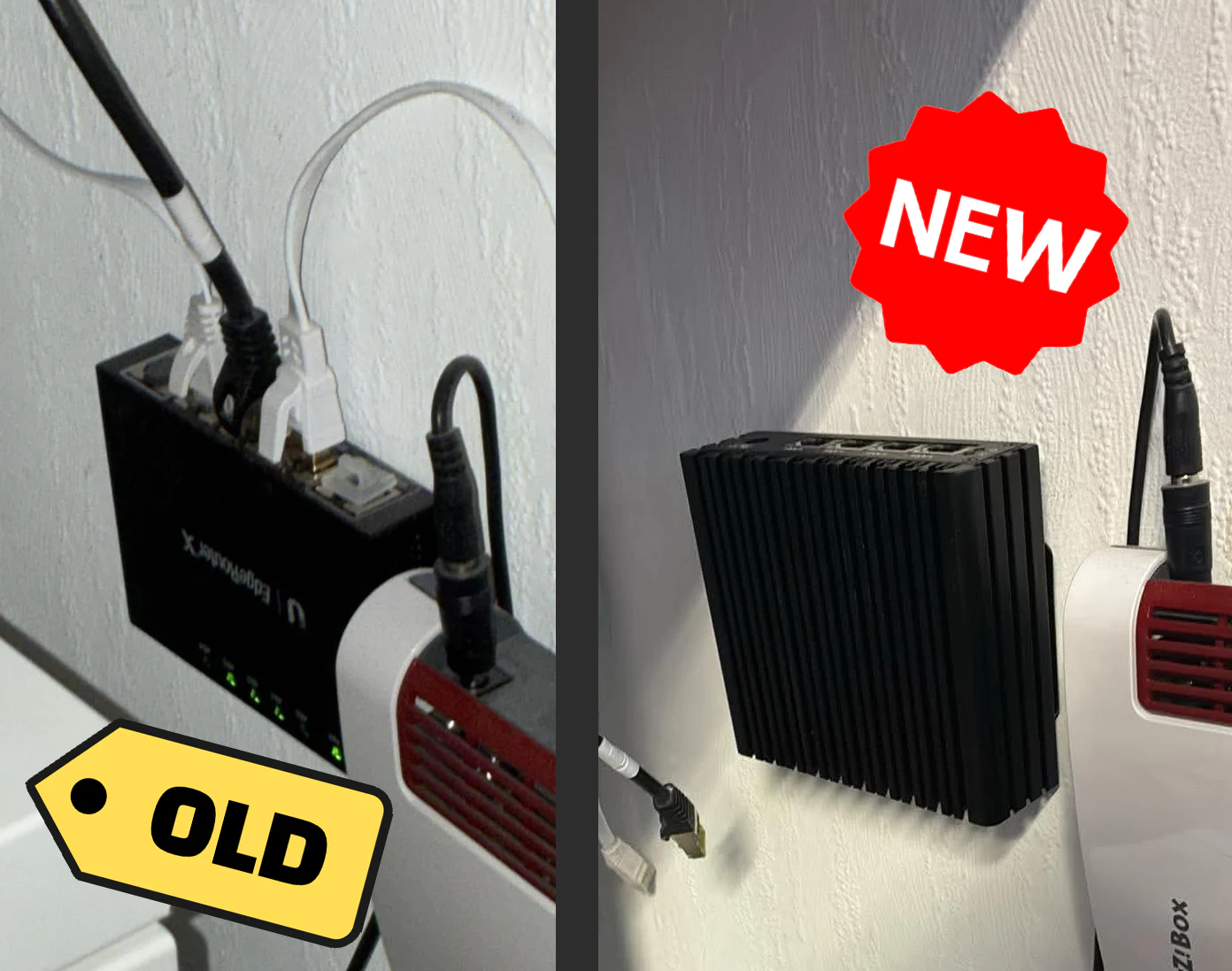
The new gateway is the CWWK F37 firewall appliance in its 8 GB/128 GB configuration. The unit uses an Intel Pentium J3710: four cores at 1.6 GHz with a 6.5 W TDP.
The processor dates to 2016. That is old silicon for a new build, but the rest of the machine is well matched to a gateway:
- 8 GB DDR3L RAM
- 128 GB SATA SSD
- 4× Intel I225-V 2.5 Gbit Ethernet ports
- fanless aluminum chassis
- dedicated RJ45 Cisco-standard serial console
The Amazon listing advertises OPNsense, but my unit arrived with pfSense CE 2.7.2, which I immediately replaced with a minimal Debian 13 installation.
I paid about 250 EUR. Newer N150-based mini-PCs are much faster, but that would add little here. A gateway needs dependable interfaces, enough memory, low idle power, and hardware that Linux understands. Routing, DNS, monitoring, and IDS fit comfortably; TLS interception is the more likely performance ceiling.
This is one of the things I like about infrastructure: the best machine is not automatically the newest one. It is the smallest system that meets the operational constraints with enough margin to remain boring.
Staging Before the Cutover
The mini-PC therefore started on a temporary address while the EdgeRouter X remained connected and continued serving the network. That made it possible to map all four NICs, pin the SSH host identity, install the services, validate the generated BIND and nftables configuration, and bring observability online before any production cable was moved.
I split the migration into a series of checks:
- prove the new DNS zone and migrated filtering policy
- verify WireGuard egress and the fail-closed route
- test every local cross-subnet direction
- check the proxy with normal web, media, and internal HTTPS traffic
- confirm metrics, logs, and service state after a controlled reboot
Only after those checks passed did I shut down the EdgeRouter and move the network links to the CWWK machine. The first production reboot exposed a stale installer-era ifupdown definition. It restored the temporary 10.0.0.3 address and a self-referential default route, which broke the WireGuard handshake and public DNS forwarding.
The fix made systemd-networkd the sole owner of the physical interfaces, reduced /etc/network/interfaces to loopback, removed the stale network state during activation, and tightened the boot order. A second controlled reboot came up with the correct addresses and routes, a healthy tunnel, working DNS, and no failed units.
Only after that evidence was in place did server.lan switch to the new resolver and the obsolete Pi-hole/BIND chain get retired.
That sequencing made the project feel less like replacing a router and more like a small production migration. The EdgeRouter remained the rollback path until the new system had demonstrated the behavior that mattered.
Designing the New Gateway
The finished gateway’s four physical Ethernet ports have explicit roles:
- the
10.0.0.0/24core network - the
172.16.0.0/24wireless network - the
192.168.0.0/24FritzBox and IoT edge - a separate recovery network
These networks are routed, not bridged. Local traffic stays local, keeps the original client address, and is not sent through the VPN. nftables marks public traffic from the core and wireless networks, and a dedicated routing table sends it through Proton WireGuard.
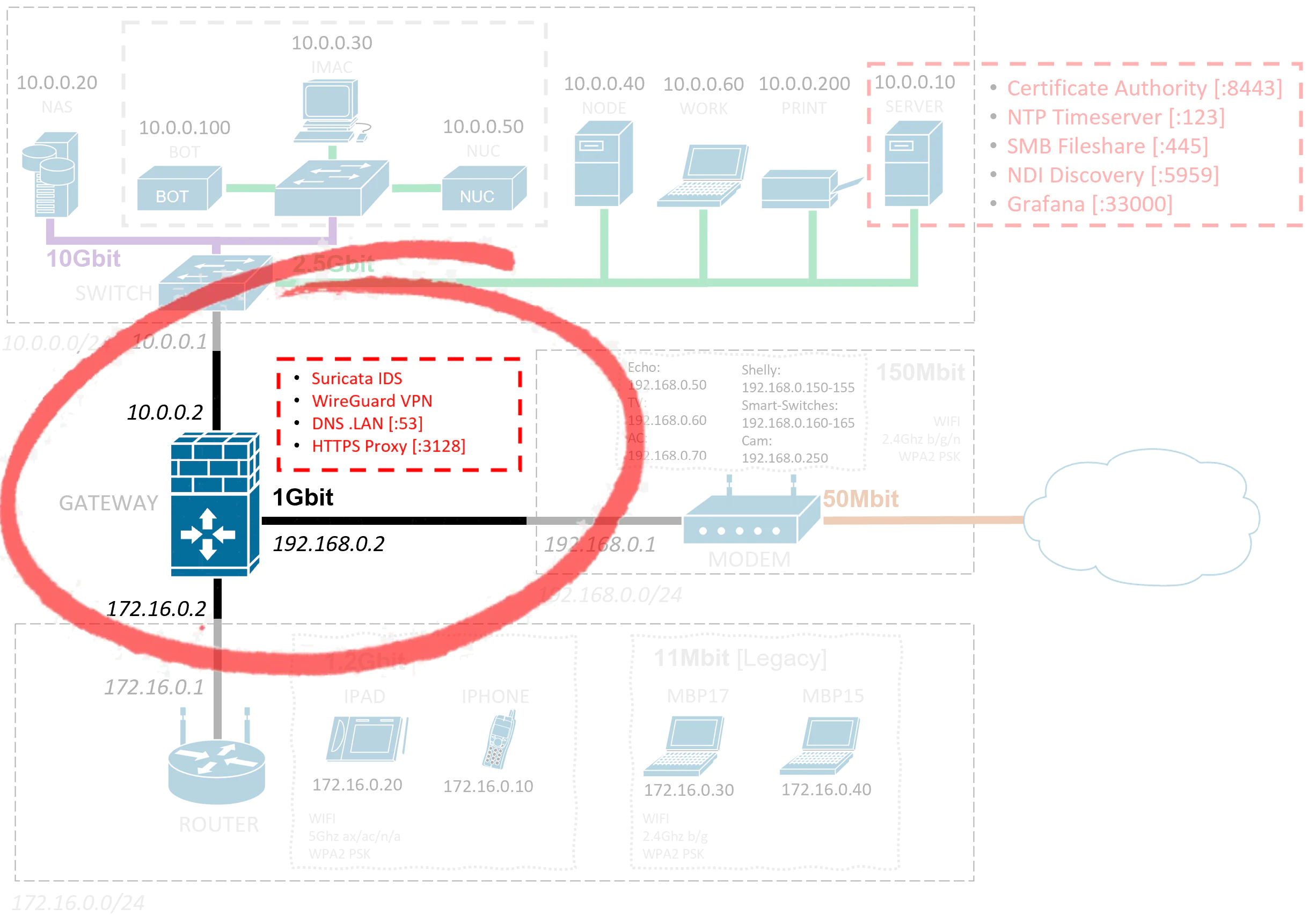
That table also contains an unreachable fallback. If WireGuard goes down, affected Internet traffic fails closed instead of leaking through the FritzBox. Higher-priority exceptions keep the local subnets reachable, so the same outage does not also take down Grafana, the camera, DNS administration, or access to other machines.
The repository tests those three promises directly: public traffic uses the tunnel, local traffic does not, and there is no accidental fallback.
Moving DNS off server.lan
DNS was the largest service migration. Previously, Pi-hole and BIND on server.lan formed a chain: one side handled the local zone and the other handled filtering. The arrangement had grown organically and was no longer especially pleasant to reason about.
The gateway now runs BIND directly on port 53. It is authoritative for the .lan zone and forwards public lookups to Proton DNS through WireGuard. Clients on the wireless side reach the same resolver through the existing OpenWrt access point, and server.lan itself now uses the gateway for DNS.
Before retiring the old stack, the enabled Pi-hole sources and custom rules were audited and translated into tracked policy. Once the gateway resolver passed the dependency checks, the former Pi-hole, BIND, and compatibility components on server.lan were removed.
That reduced the design to one clear source of truth:
- the gateway owns network addressing and DNS policy
server.lanremains a server for monitoring, certificates, storage, and its other application roles- the
.lanzone is represented in version-controlled configuration instead of being split between two live DNS products
The result is simpler both technically and mentally. A DNS issue now has one obvious place to investigate.
BlankProxy Instead of Another Pi-hole
The goal was simple: remove ads more cleanly than I could with Pi-hole alone. Pi-hole can block a domain at the DNS level, but the browser or app still receives a failed request. That can leave broken placeholders, trigger retries, or make media players wait for a timeout. Some major websites that rely on advertising revenue also detect this obvious circumvention and shut you out.
BlankProxy is custom Python code running as a mitmproxy addon. Selected clients use it as an explicit proxy. Allowed HTTPS connections pass through unchanged; blocked domains are intercepted with a dedicated TLS inspection certificate.
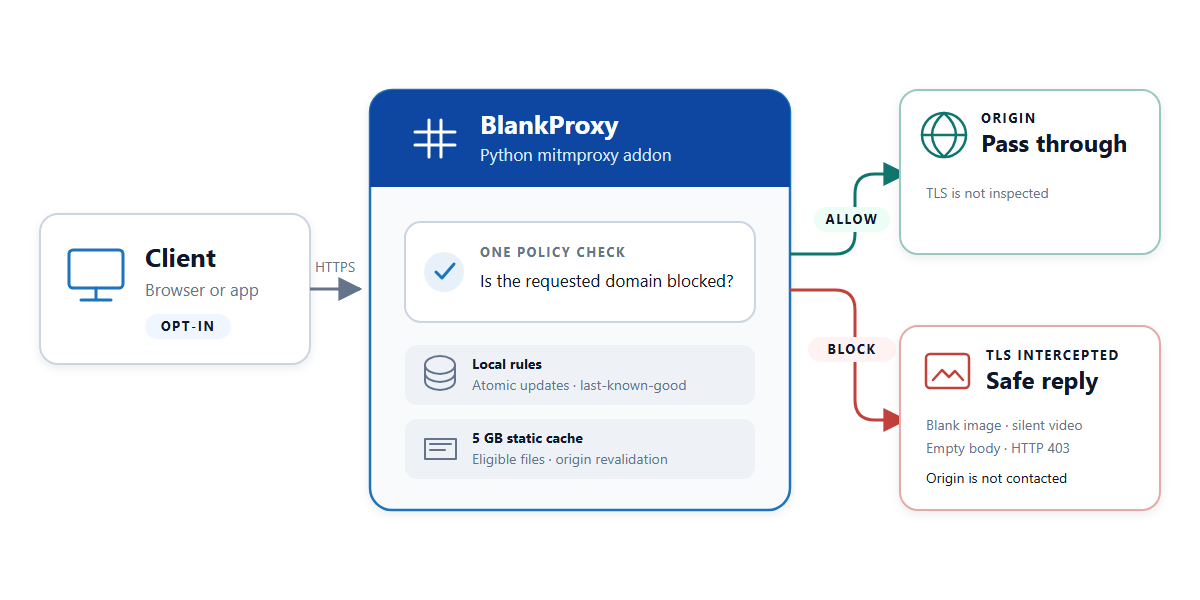
Because BlankProxy can see the blocked request, it can return the right replacement: a tiny blank image, a one-frame silent video, an empty response, or HTTP 403. The ad disappears without handing the application malformed media or a dead connection. That also cleanly circumvents the advanced anti-ad-blocking techniques that some major websites now use.
The proxy uses the former Pi-hole blocklists and custom rules through a local database. Updates are atomic and retain the last-known-good data if a source fails.
A small 5 GB cache became a useful side effect, not the main purpose. It stores only eligible public static files and revalidates them with the origin before reuse.
Security That Can Actually Reach Me
The new machine also had enough headroom for Suricata, running as a passive intrusion detection system (IDS) on the WireGuard interface. pmacct records bounded traffic metadata, while Prometheus exporters and Alloy provide metrics and selected logs. Suricata sees encrypted tunnel packets and TLS metadata, including BlankProxy’s upstream connections. It does not see the proxy’s decrypted HTTP bodies.
I did not want another security product that quietly produces a large file nobody reads. This is where the migration crossed into my OpenClaw agent, but with an important design choice: not every automation path needs an LLM.
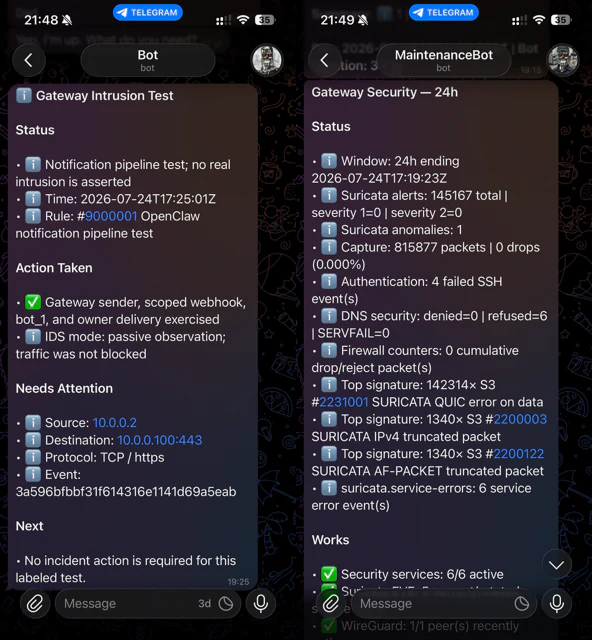
OpenClaw now has a restricted network-ops MCP integration for the gateway. At 06:45, a fixed securitydigest job opens one MCP session and requests a bounded, read-only summary of the previous 24 hours. The report combines Suricata alerts, service and capture health, failed SSH authentication attempts, DNS security events, BlankProxy errors, firewall counters, failed units, and WireGuard freshness. It arrives in the same Telegram style as the other morning checks without spending a model turn.
A separate urgent path handles fresh severity-1 Suricata alerts with valid signature IDs. A small gateway service tracks its log position, queue, and deduplication state before sending qualifying events through a narrowly scoped HTTPS webhook. OpenClaw validates the fields, and bot_1 delivers a fixed owner-facing Telegram alert. The wording reflects Suricata’s passive role: it reports an observed rule hit, not proof of compromise or evidence of blocked traffic.
That separation is important:
- routine evidence becomes one concise daily security digest
- high-severity events take a low-latency paging path
- deterministic work stays deterministic instead of invoking a model by default
It is a much more useful security loop than simply installing an IDS and hoping I remember to inspect it.
One Migration, Multiple Repositories
The network cutover itself was only one layer of the work. The migration also changed the systems that describe and observe the network.
The Grafana repository was updated to remove the retired Pi-hole panels, point internal DNS checks at the gateway, consolidate the gateway dashboards into one curated high-signal view, and add compact CPU and RAM panels to the normal overview screens. The existing camera, weather, server, and service monitoring remained part of the same display on the iPad.
The OpenClaw repository received the new gateway inventory, pinned-key SSH integration, proxy-cache health checks, daily security digest, urgent Suricata webhook, Telegram templates, tests, and deployment configuration.
This is where Codex made the largest difference. A human can certainly edit all these repositories, SSH into multiple machines, reconcile documentation, run tests, deploy Docker stacks, and verify live traffic. The expensive part is maintaining context across all of it. A change in DNS affects the gateway zone, the Linux host resolver, Docker containers, Grafana probes, OpenClaw inventory, documentation, and recovery assumptions. Missing one of those produces the kind of stale infrastructure that works until the next reboot.
With an agentic coding workflow, I could state the desired end condition and then keep the work tied together across those boundaries. Codex could inspect Git history, trace references, update code and tests, perform read-only live checks, deploy through the existing scripts, and bring the documentation forward with the implementation.
That does not remove the need for supervision. I still had to decide when to shut down the old router, physically move cables and power supplies, approve the trust model for managed proxy clients, and judge whether the final behavior matched what I wanted. The agent was most effective when the constraints were explicit and the repositories already encoded safe deployment paths.
The Result
The EdgeRouter X has now been replaced by one small, low-power Debian machine that owns the network edge coherently:
- routed separation across the three active LANs
- fail-closed WireGuard for core and wireless Internet traffic
- local cross-subnet routing without sending LAN traffic through the VPN
- authoritative
.lanDNS and recursive forwarding on the gateway - opt-in proxy filtering with safe media replacements and limited caching
- Suricata IDS, flow accounting, metrics, and log shipping
- bounded daily security digests and immediate high-severity alerts
- Grafana dashboards aligned with the actual deployed architecture
Just as importantly, the old Pi-hole/BIND chain and its stale monitoring references are gone from server.lan. The infrastructure now has clearer ownership, tracked configuration, recovery documentation, and tests around the behavior that matters.
The interesting lesson for me is not that AI can write an nftables rule or a Grafana panel. It is that an agent can help carry a system-level change across code, live infrastructure, validation, and documentation without treating each repository as an isolated task. The result is also infrastructure that I likely would not have built this quickly or this comprehensively without AI working beside me.